Showing posts with label Blogger tips. Show all posts

Monday, August 15, 2011

How To Install Meta Tag Blogger

meta tag in the blog so is important. one way to improve the position of our blog on search engines. and also can make our blogs friendly to search engines. meta tag is called the identity of the blog itself. how to install it please follow the following steps:


1. Login to Blogger
2. Go to the "Edit HTML".
3. Find <data:blog.pageTitle/> <title> code </ title>
4. Replace that code with the code below. Post title will be the title of the blog

<b:if cond='data:blog.pageType == "index"'> <title> <data:blog.title/> </ title> <b:else/> <title> <data:blog.pageName/> </ title> </ B: if>

5. then plug the code below meta tag just below the code before meta

<meta expr:content='data:blog.pageTitle + " write your description here"' name='description'/>
<meta expr:content='data:blog.pageTitle + ", Keyword 1, keyword 2, keyword 3, dst "' name='keywords'/>
<meta content='INDEX, FOLLOW' name='ROBOTS'/>


Examples like this:

<b:if cond='data:blog.pageType == "index"'> <title> <data:blog.title/> </ title> <b:else/> <title> <data:blog.pageName/> </ title> </ B: if>
<meta expr:content='data:blog.pageTitle + " write your description here"' name='description'/>
<meta expr:content='data:blog.pageTitle + ", Keyword 1, keyword 2, keyword 3, dst "' name='keywords'/>
<meta content='INDEX, FOLLOW' name='ROBOTS'/>

6. Do not forget to "Save Template" after installing the meta tags.


Tuesday, August 9, 2011

How To Put Google Adsense ads Side By Side

format and the location or position google adsense ads are the sala of the determinants of success of the publiser adsense. we must consider all matters in choosing the format and position of ads will be placed on the blog page / web us. one of which is to put google adsense side by side. as shown below.


Saturday, August 6, 2011

How To Shorten URLs with the Google URL Shortener

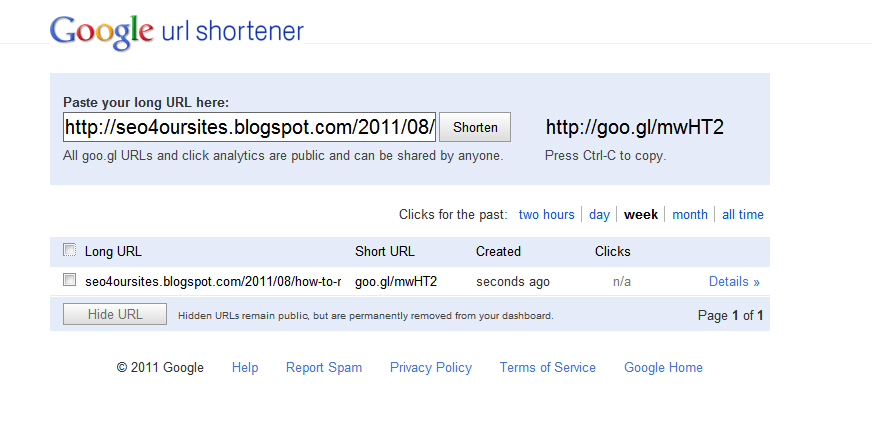
Long URLs sometimes make it difficult to remember. Google URL Shortener you can shorten your url and make your URL easy to remember and easily share it to everyone. how easy to visit the Google URL Shortener then enter the URL you want the cut and then click shorten. look!! Your URL will be short and easy to remember, is not it?? To more clearly see the picture below

My URL to be like
Long URL: seo4oursites.blogspot.com/2011/08/how-to-make-related-post-blogspot.html
Short URL: goo.gl/mwHT2

How To Make A Related Post Box Blogspot

Related Post or other related information that is essential to provide other information to the visitors of your blog / website. visitors can easily find other information that still has something to do with the article being read in our blog pages. let's learn to make Related Post by following these steps:


Tuesday, August 2, 2011

How to Create Scroll box

scroll box in use to organize and tidy up a list of posts / links or a banner for the purpose of minimization of the blog and in addition it can also beautify your blog.


Monday, August 1, 2011

How To Create Read More Without A Script In Blogger (Without Edit Template)

  1. Write your article through to completion
  2. Put the cursor on the text that you want to enter Read More.
  3. click Icon Insert jum break 
     4. Publish the article.
     5. see the finish post in your home.

 
© Copyright 2010-2011 SEO4OURSITES All Rights Reserved.
Template Design by Herdiansyah Hamzah | Published by Borneo Templates | Powered by Blogger.com.